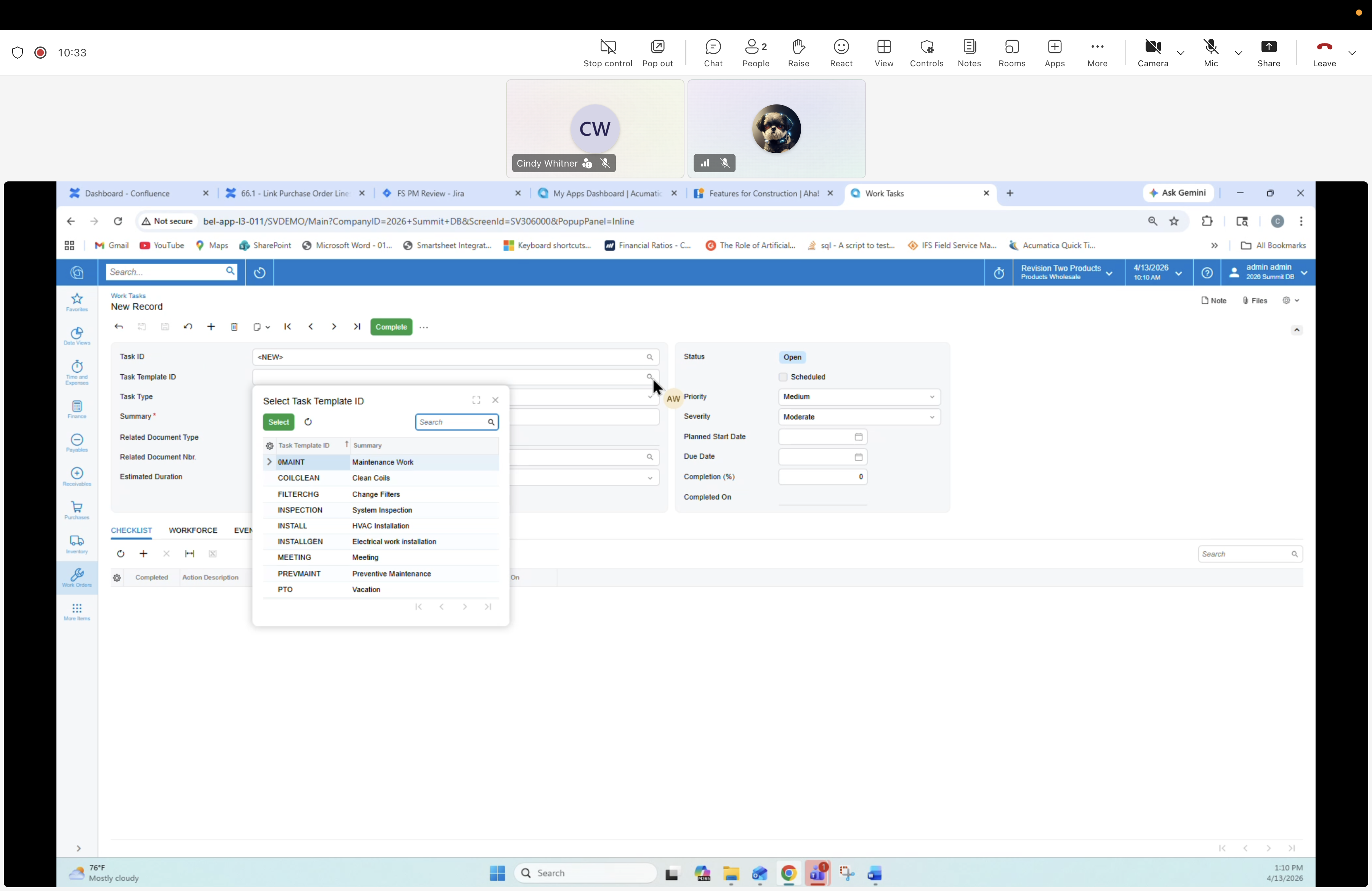
04 — Work Task: Task Template Lookup
Description
Creating a new Work Task (New Record). The Task Template ID lookup popup is open, showing the catalog of reusable templates. Work Task Templates replace the old "service-type inventory items" — they define checklists, estimated duration, workforce requirements and auto-fill onto Work Orders via Work Order Type.
Screen
Work Tasks form — New Record.
Header fields (blank)
- Task ID
- Task Template ID (lookup open)
- Task Type
- Summary
- Related Document Type
- Related Document Nbr.
- Estimated Duration
- Status (Open)
- Scheduled (checkbox)
- Priority (Medium)
- Severity (Moderate)
- Planned Start Date / Due Date
- Completion (%) / Completed On
Task Template lookup popup
Columns: Task Template ID | Summary. Rows visible:
- ENVMT — Maintenance Work
- COILCLEAN — Clean Coils
- FILTERCHG — Change Filters
- INSPECTION — System Inspection
- INSTALL — HVAC Installation
- INSTALLGEN — Electrical work installation
- MEETING — Meeting
- PREVMAINT — Preventative Maintenance
- PTO — Vacation
Lower tabs
CHECKLIST, WORKFORCE, EVENTS.