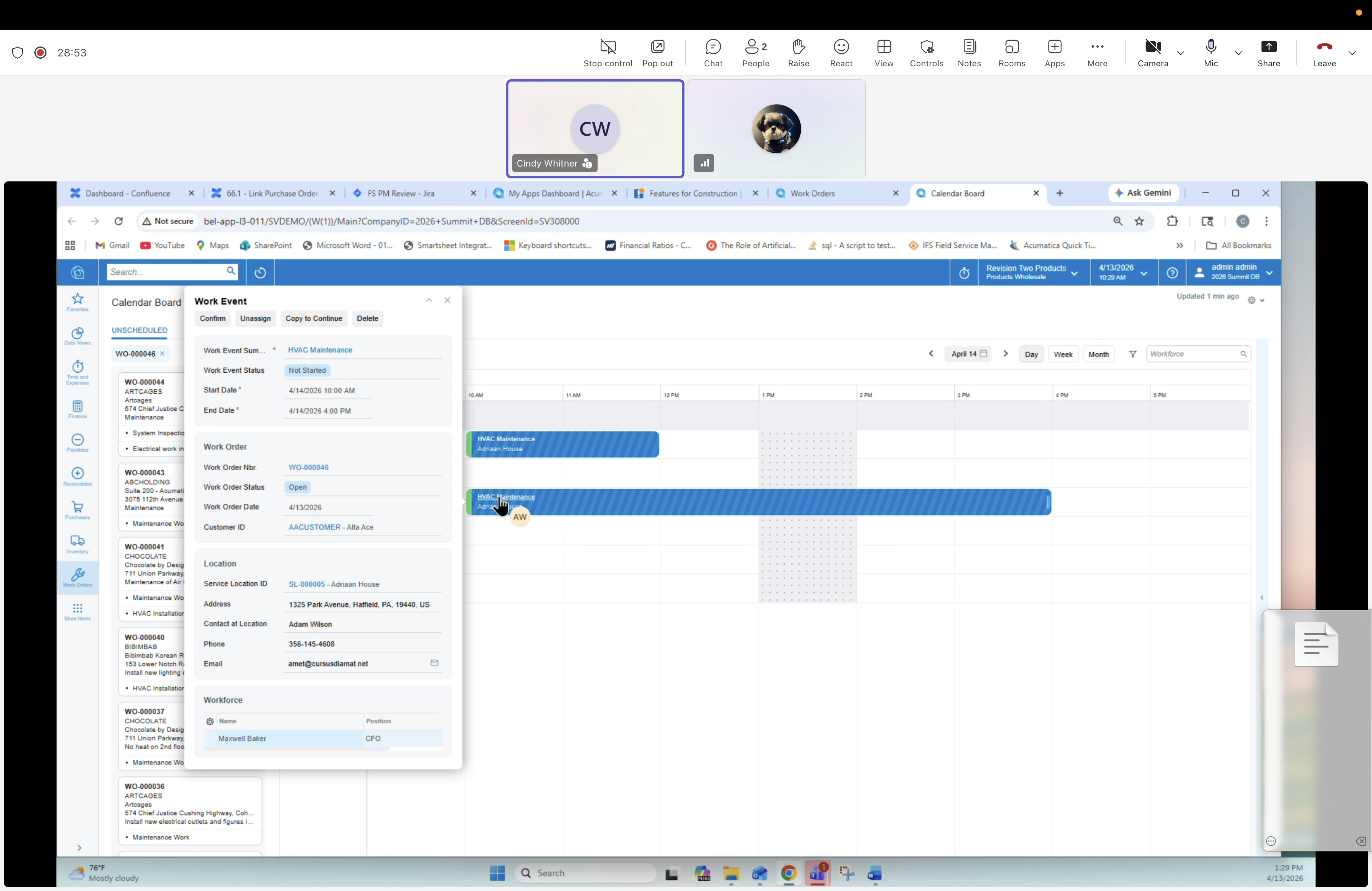
26 — Work Event: Side-panel details
Description
Clicking a bar on the Calendar Board opens the Work Event details as a right-hand side panel. The event is a scheduling record linking the Work Order, task, location and workforce; it is the object that becomes a Work Ticket for the technician.
Panel header / actions
Tabs: Confirm, Unassign, Copy to Continue, Delete.
Fields — Work Event
- Work Event Nbr: (draft)
- Work Event Status: Not Started
- Start Date / End Date: 4/14/2026 · timespan
- Start Time / End Time
Fields — Work Order
- Work Order Nbr: WO-000046
- Order Type: MTNC
- Summary: HVAC Maintenance
- Customer ID: AACUSTOMER
Fields — Location
- Service Location ID: AL00026 — Adriaan House
- Address: 1325 Park Avenue, Hatfield, PA 19440
- Contact at Location: Adam Wilson
- Phone: 206-145-4503
- Email: emil@crossadamcal.net
Workforce section
- Name / Position grid — e.g. Maxwell Baker, Service Technician